Posted on 06/07/2010 6:07:24 AM PDT by GregB
I have reinstalled XP Pro and can't hookup via wireless
Is the wireless driver loaded? The last two Dell machines I reloaded, I had trouble locating which actual wireless device was installed as the Dell software didn’t do a good job picking it up or installing the driver at all.
My brother bought it used an dput in XP Home to make sure it worked and I put in my own XP Pro and had wireless working.
Dell Latitude 1 GIG mgz
256 memory
20 gig HDD
XP Pro
My brother bought it used an dput in XP Home to make sure it worked and I put in my own XP Pro and had wireless working.
Dell Latitude 1 GIG mgz
256 memory
20 gig HDD
XP Pro
Check your drivers. Same thing happened to me and it was the wireless card driver.
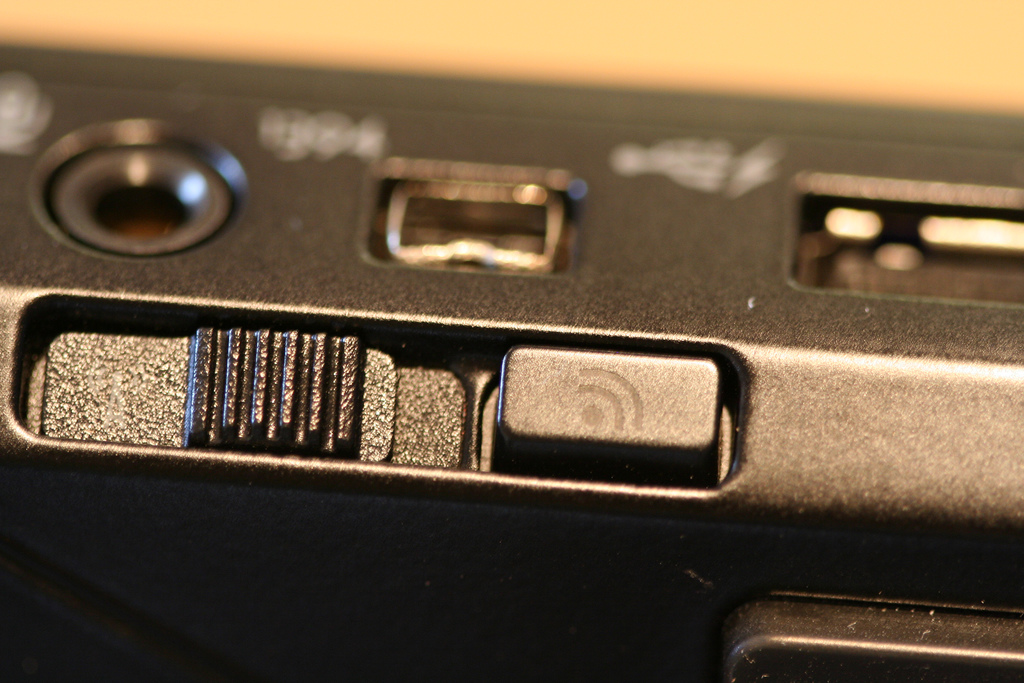
Is the switch on?
The driver is almost certainly your problem. Drove me crazy until I figured that out. The drivers are on the Dell utilities disk, but they are hard to find. As I recall, I found them in the files for the Dell Connection Manager. I had to install this application to get the drivers and then later uninstalled Dell Connection Manager which I found to be a very annoying little program.
Probably drivers, or you need to manually configure your SSID & encryption.
Look in Device Manager to see if your wireless device is recognized. If not, you’ll have to install, set up the drivers.
If you reloaded from the factory restore disc, you’ll probably need to load the drivers from a second disc labeled “system resources” or the like. Alternately drivers can be downloaded from www.dell.com
obvious question first, is it turned on?, there is probably a switch on the side.
also, go to network connections, in control panel, see if there is an icon for wireless, is it enabled?
also in control panel, check the system icon, go to hardware tab, then device manager, then network manager, see if the wireless shows up there.
could be hardware failure but if you’re lucky its either turned off, needs to be re-enabled or re-installed.
Also check to see if you have one of those ‘buttons’ that power on your wireless adapter. Sometimes those things get pushed, disabling the adapter.
The wireless driver does not get installed automatically. You need to get it from Dell or the resource disc.
Wireless board crapped out....needs new one
Ok going to check drivers..
Can’t find that switch.
‘then later uninstalled Dell Connection Manager which I found to be a very annoying little program.”
its a PITA. Has to be the worse application I’ve ever received on a pre-built computer.
Have you called Geek Squad?
LOL, just kidding, all of the best answers were already posted here.
It might not be on yours, but it is something to check if it is. Drivers are more likely, as others have pointed out from a position of more familiarity than I have.
Bookmark for later.
Right click on “My Computer”, select “Manage”. When that comes up, on the left side of the screen, select “Device Manager”. On the right, you’ll see all devices, including your network connections. Identify the wireless card. You’ll need to install the driver. If you have it on an available CD, great. Click on the network card and select Update Driver. If you don’t have a CD, you’ll have to get to another computer, get online, go to Dell’s Web site, download the driver to a pen drive, then plug the pen drive into your laptop. You can update/install the driver from the pen drive. Hope this helps.
I had problems with my wireless with heat issues with my laptop running xp. I removed the battery and ran it with the plug only. I put it on a laptop cooling stand, and I added a pcmcia driven wireless network card. These steps worked so well, that once I took out my wireless card, the old internal wireless network started working again with the cooling changes. The pcmcia card is half in/half out and away from processor so that will work, too. Try any of these until you get back. Oh, if you use a pcmcia card, or usb network card, turn off the wireless internal network card.
Get a MAC
You have made my day - week - month!!!!!!! Since at least November I have not been able to get internet on my laptop so I just have to sit in my home office on the PC to get online. I have spent hours trying to figure out what went wrong - my laptop was next to my chair in the living room and my children and grandson all used it when they came over. It stopped working on one of their visits and I haven’t had the extra money to take it to someone.
I didn’t even KNOW that there was a little switch on the side. I just found it and turned it on and I AM BACK ON LINE!!!
Yeah!
my Dell doesn’t have a switch, the top row on my keyboard has a wireless icon. It took me a long time to find it, but that’s where it is.
I’m pleased to have been able to help someone. My Monday just took a turn for the better.
Get the Service Tag from the back of the laptop. Go to support.dell.com. Click on the “Drivers and Downloads” icon (approximately center upper page). Enter your Service Tag, make sure you select the correct operating system and browse for the Network group. Download and install the wireless driver(s).
If you did not use a Dell driver disk, then you should at minimum, also download and install the chipset drivers. Actually you should do that first :-)
My experience with laptops is that they do much better with the vendor provided drivers as opposed to the Windows provided drivers.
Solution:
Look on the back of your laptop for the Service Tag number.
Go here, enter your Service Tag number and download the Wireless adapter driver from Dell.
Install the driver by double clicking on the executable you downloaded. It will create a directory in C:\Dell that will have a number like "R76521" as the name. In there, double click on the Setup.exe file and that will install the driver for your laptop's wireless adapter.
Reboot the machine and the rest you should know how to do by right clicking on the wireless icon in the System Tray.
THANK YOU!!!!!!! I had trouble on a recent trip and when I went to use my wireless, all of a sudden the “wireless radio” wouldn’t turn on. Nothing worked, so I finally went out and got a USB wireless card, which has been failing, not to mention taking up my one USB 2 port. I never knew about the switch. I flipped it and BINGO! I have my wireless back. Thank you, thank you, thank you!!!!!!!!
Where to begin.
I have reinstalled XP Pro and control panel network connection I found the wireless connection which said enabled no net so I hit repair and I got an error it said can’t renew IP address 169.254.112.157
I had changed over to a newer Westell router and I just dragged out the old one and hooked it up and I am on. Any ideas as to why the new one does not work? Thanks for all the help!!
hi, glad to hear its working,
The one I am using is 4 years old and the newer one is mabye one. The older Westell router works but not the newer. Puzzling. Thanks to all for your help!!
Disclaimer: Opinions posted on Free Republic are those of the individual posters and do not necessarily represent the opinion of Free Republic or its management. All materials posted herein are protected by copyright law and the exemption for fair use of copyrighted works.