Skip to comments.
Fellow Freeper needs a tutorial
Posted on 06/14/2008 4:21:59 AM PDT by GunHoardingCapitalist
I am trying to figure out how to post pictures in both new posts and post replies. If anybody can give me a simple step by step it would be greatly appreciated.
TOPICS: Computers/Internet
KEYWORDS: help; howto; pictures
Navigation: use the links below to view more comments.
first 1-20, 21-30 next last
To: GunHoardingCapitalist
Leave out the space after "<", otherwise like this:
< img src ="[URL where picture is hosted]">
Jim Rob doesn't have the budget to host your snapshots ;)
Example:
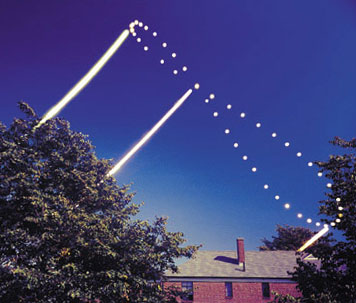
< img src ="http://www.analemma.de/images/articles/dicicco.jpg">
without the space after < produces this:
To: GunHoardingCapitalist
Right click the pic and get its address.
Paste it into the following:
<img src='XXXXXXXXX'>
It will look like:

By the way, I made the code appear above by using <xmp> before it and the same thing with a "/" after it.
3
posted on
06/14/2008 4:32:21 AM PDT
by
Onelifetogive
(Simple-minded conservative...)
To: GunHoardingCapitalist
4
posted on
06/14/2008 4:33:07 AM PDT
by
FreedomPoster
(<===Non-bitter, Gun-totin', Typical White American)
To: GunHoardingCapitalist
5
posted on
06/14/2008 4:34:44 AM PDT
by
FreedomPoster
(<===Non-bitter, Gun-totin', Typical White American)
To: GunHoardingCapitalist

<img src='http://www.latimes.com/media/photo/2008-06/39958184.jpg'>
6
posted on
06/14/2008 4:36:17 AM PDT
by
samtheman
To: Lonesome in Massachussets
What is that picture? That’s interesting.
7
posted on
06/14/2008 4:36:51 AM PDT
by
samtheman
To: GunHoardingCapitalist
Search FR or Google HTML Sandbox:
All knowledge emanates from the Sandbox.
To: GunHoardingCapitalist
OK, first, any picture you wish to show has to be "hosted on the web"-- it has got to be on a web server, not your hard drive. Google "free photo hosting" for a list where you can put your own pictures. If it's already on the web, hover your pointer and right-click-- see that "properties" in the menu? Click that, and the "http" stuff is the web address of the graphic. Copy that somewhere, then take this string: < img src="" > being sure to remove the space I added after the first bracket and before the last to make it "visible" here. You copy the web addy in between the quotes, and viola!

9
posted on
06/14/2008 4:38:45 AM PDT
by
backhoe
(Just an old keyboard cowboy, ridin' the Trakball in to the Sunset...)
To: GunHoardingCapitalist
To: samtheman
An analemma taken by Dennis DiCicco 1976-1977 and published in
Sky and Telescope in 1978, iirc.
DiCicco was the first to do it, back in the days before digital cameras.
NASA's pathfinder did one on Mars. 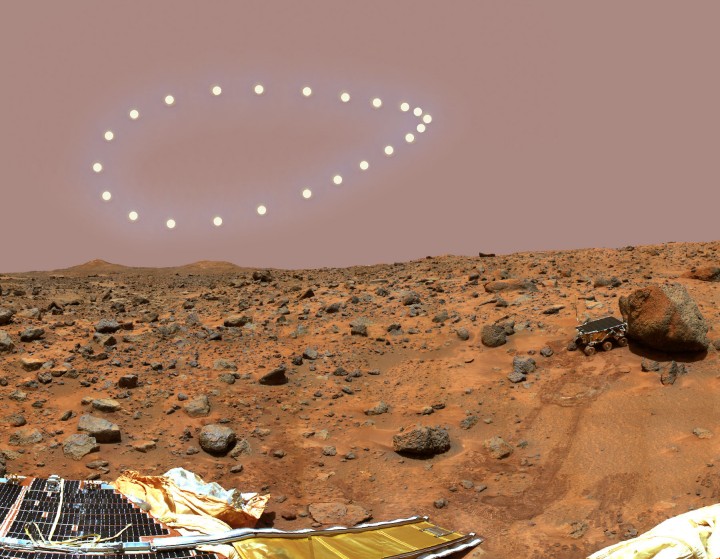
On earth the southern loop is exaggerated by the phasing of the vernal equinox and perihelion. (In 12,000 years, the northern loop will be larger, in 6000, about equal.) On Mars, because of his greater orbital eccentricity and the phasing between Mars' vernal equinox and perihelion, the southern loop has been pinched into a point.
To: samtheman
Isn't that hotlinking?
I thought we were always supposed to save photos to our hard drive, and then upload them to a free photo hosting site like shutterfly or flickr.
To: Lonesome in Massachussets; GunHoardingCapitalist
Jim Robinson has always said to add the width and height because the thread will load up faster. I do it like this.
< img width=356 src="http://www.analemma.de/images/articles/dicicco.jpg"heigth=303>
13
posted on
06/14/2008 1:37:04 PM PDT
by
Spunky
(You are free to make choices, but not free from the consequences)
To: SeafoodGumbo
"I thought we were always supposed to save photos to our hard drive.... I never do. I just go to whatever site and copy the properties. If you want the picture to stay around for a long time it is probably best to do it your way. Otherwise they disappear.
14
posted on
06/14/2008 1:41:37 PM PDT
by
Spunky
(You are free to make choices, but not free from the consequences)
To: Spunky
Jim Robinson has always said to add the width and height because the thread will load up faster.
This seems incorrect to me. My understanding is that specifying the height and width affects the display size, but not the download size. That is, if one specifies a smaller height and width, then each of us viewing that thread will still have to download to our PC's the same, big, old, fat image file, but then it will display in our web browser shrunk down a bit.
The only way I know to speed up handling of large images is to first convert them to a small image using some image processing program on your own PC, then uploading the shrunken image file to a web site, and setting your <img src=URL> to that uploaded, smaller, image file.
One other detail -- I would specify only one of height or width, not both, in most cases. If you specify both, and don't get their ratio the same as the height-width ratio of the original image, then you will force the displayed image to be stretched in one dimension or the other. Better to just display one of the two, height or width, and let the other default to whatever is needed to preserve the proportions of the original image.
15
posted on
06/14/2008 4:26:14 PM PDT
by
ThePythonicCow
(By their false faith in Man as God, the left would destroy us. They call this faith change.)
To: Spunky
To: GunHoardingCapitalist
Two steps to posting images:
- Figure out the image's URL, perhaps by right clicking on the image as it displays on some web site and examining the properties or if your browser supports it, picking the Copy Image Location choice off the right-click menu, to put the image URL directly into your copy&paste buffer. For the next step, let me use a URL for an image of one of my favorite animals: http://www.isrealli.org/wp-content/uploads/cow.JPG
- Given that URL, then type into your FreeRepublic post or reply:
<img src=http://www.isrealli.org/wp-content/uploads/cow.JPG>
The above html line, if posted directly into a reply here, displays

17
posted on
06/14/2008 4:43:58 PM PDT
by
ThePythonicCow
(By their false faith in Man as God, the left would destroy us. They call this faith change.)
To: Lonesome in Massachussets
without the space after <
You can avoid having to put those spaces around
< characters in such replies by typing in the four characters:
<
instead of the single
< character. Such details as that can really help those who are trying to figure this stuff out. The
lt in there stands for
Less-Than.
18
posted on
06/14/2008 4:48:04 PM PDT
by
ThePythonicCow
(By their false faith in Man as God, the left would destroy us. They call this faith change.)
To: SeafoodGumbo
Well, -all- image posting has to have a URL pointing to
some server on the world-wide-web that is hosting that image. One can do one of:
- Hot link to the original site using that image, which is the easiest way, but fails if that original image is no longer available from that site
- Copy the image over to a free photo hosting site, as you suggest, which then depends on that free site continuing to display it. Free sites that don't have some way to make money tend to vanish, or at least, tend to quit serving up such images for free hot links from other sites.
- Provide your own web site, and host the image there, which lasts as long as you pay the monthly bill for your own web site.
- Use the limited web space provided by your ISP (for some ISP's) for hosting the images, which lasts until you change to a different ISP.
- Probably other choices for web servers that I haven't thought of here.
For quickie posts, I hot link, being lazy. This avoids having to copy the image to some other web server.
For posting of some critical image that I don't want to go away for a long time, say if I had conclusive proof that a letter "proving" that George W. Bush had skipped out of National Guard duty was really a forgery on a modern day word processor, I'd upload that image to the most reliable web server I could afford (and keep backup copies of that image in multiple, off-site, secure, locations.)
19
posted on
06/14/2008 4:58:21 PM PDT
by
ThePythonicCow
(By their false faith in Man as God, the left would destroy us. They call this faith change.)
To: GunHoardingCapitalist
For best results, add the dimensions of your image to the HTML. This will help the web page to load in everyone's browsers without a lot of unnecessary page redrawing and jumping around.
For example, if you have an image file called "myImage.jpg" uploaded to your server with an eponymous domain name, and the size of the image is 640 pixels wide and 480 pixels tall, the HTML would look like this -
<img src="http://www.GunHoardingCapitalist.com/myImage.jpg" width="640" height="480">
Just type that HTML into your FreeRepublic.com text box, and it will embed the image in your message.
Of course, you would substitute the correct domain name for your host, the correct file name for your image, and the correct dimensions for your image.
Adding the dimensions is an especially good idea if your image was not stored with the standard resolution - 72 dots-per-inch (DPI). If you used your digital camera to create the image, it is is probably using a higher resolution.
20
posted on
06/14/2008 5:16:32 PM PDT
by
HAL9000
("No one made you run for president, girl."- Bill Clinton)
Navigation: use the links below to view more comments.
first 1-20, 21-30 next last
Disclaimer:
Opinions posted on Free Republic are those of the individual
posters and do not necessarily represent the opinion of Free Republic or its
management. All materials posted herein are protected by copyright law and the
exemption for fair use of copyrighted works.
FreeRepublic.com is powered by software copyright 2000-2008 John Robinson